

AI for Message Testing
A Practical Guide for Business Owners and Communicators
Using AI to test messages might seem like a random way to use it. The reason we are covering it is that it keeps coming up in our research.
For her new book, AI for Strategic Communication Volume II: Practical Integration, Dr Karen has been interviewing communication leaders around the world, with 12 countries represented in the study. Testing messages with specific target audiences before sending them has been one of the most common uses out in the field.
The appeal is easy to understand. Market research takes time and costs money. AI gives you a reasonable idea of how audiences may respond to and understand your messages before they go anywhere, so you have the chance to tweak and refine until they land properly and people do what you need them to do.
Where Messages Go Wrong
Have you ever sent a message that people read differently from how you intended? You worked hard on it, and the response was nothing like what you expected. Usually it is one of three things.
The audience misunderstood it
They read something you did not write, or they missed the part that mattered most.
The tone landed badly
They understood it perfectly well, and it came across as tone deaf.
People missed what they needed to do
The call to action was not strong enough, so nothing happened.
Often it is more than one of those at once. When you have not done your research into a specific target audience, and they are really far removed from you as a person, getting inside their minds and writing in a way that resonates is very hard. That is exactly where AI can help.
What Communicators Are Already Doing
We scanned the industry literature to see how some of the bigger communication firms are approaching this. Three examples stood out.
United Minds are testing employee messages. They have created AI personas based on research within the company, and they test their messaging before it goes out more broadly to internal audiences.
Weber Shandwick are exploring sceptical interpretations before releasing a statement. Most of us have done a version of this in meetings, playing devil's advocate and thinking of the worst possible understanding an audience might take, so we can counteract it and mitigate the risk of it landing poorly. They are using AI to find that worst case and then walk backwards from it.
Teneo are comparing alternative messaging for different audiences. A/B testing has been around a long time, and it needs live audiences. They are running simulated A/B tests with synthetic audiences created by AI.
A synthetic audience is simply a set of AI profiles built from information you already have about your audience, used to simulate possible responses. The demos below are a simplified version of those same approaches.
The Golden Rule
AI helps you identify things to check. Real audience feedback tells you which concerns actually matter.
None of this is ever going to be 100% accurate. With the right data behind it, it is useful enough to change what you send. The quality of what comes back depends entirely on the quality of what you put in, so the more context you can give it, the better.
You will notice the prompts below are strict about this. They tell the AI not to invent names, ages or segment sizes, to mark inferences as inferences, and not to force criticism where none exists. That matters. Nine invented comments do not establish real audience segments, and a simulated reaction is not a customer telling you something.
The Example We Used
Everything below runs on one fictional scenario. Clearspace Cleaning, a home-cleaning business introducing online bookings.
Online bookings open on 9 November, available at any time of day
Customers can still call to book or ask questions
The phone line is staffed Monday to Friday, 9am to 5pm
Existing bookings stay in place, and nobody needs to rebook
Service prices are unchanged by the booking change
The communication objective is set as customers understand that online booking is an additional option, recognise that telephone booking and questions remain welcome, and know how to take the next step.
The audience comments were nine invented examples, written as teaching material rather than collected research. Comments like "I usually remember to book after the kids are in bed, the office is closed by then" and "I already have a regular booking, if you change systems do I have to arrange it again?" Real comments from your own research will do a far better job.
Step One: Simulated User Interactions With ChatGPT
The question this one answers is what people understand and what they want to ask. We used ChatGPT for it.
Add the business facts and audience feedback. The brief and the comments, pasted together, without the draft announcement yet.
Build three audience profiles from that feedback. Every profile should show which comments support it.
Show each profile the same announcement. One message, three sets of eyes.
Ask what they understood and what they would ask next. This is where the gaps appear.
The prompt
Help me build a small synthetic audience for a message-testing exercise. The business brief and audience comments follow this prompt.
Create three distinct need-based audience profiles supported by the comments. For each, show: a short descriptive label, what the person needs from the booking process, what information matters to them, supporting comment IDs, and what we do not know.
Do not invent names, ages, personal histories, attitudes or segment sizes. Explain any overlap between profiles. Mark any inference as an inference. These are simulated perspectives, not three representative customer groups.
Keep the whole output under 250 words. Do not test or rewrite a message yet.
Paste your brief and your audience comments underneath it in the same message.
What came back
Three profiles, with the grouping flagged as an inference rather than established fact:
Convenient direct booking. Wants to arrange a known service outside office hours, and needs all the information up front.
Guidance and access to a person. Does not know which service they need, so prefers to speak to someone during business hours.
Clarity around existing arrangements. Already books by phone and wants to know where that leaves them.
If it invents ages, personalities or group sizes, ask it to remove them before you go any further.
Testing the announcement
The next prompt puts the draft in front of all three. The important constraint is the second paragraph, which stops the AI quietly filling gaps from the brief that your real readers will never see.
Use the three profiles we have just checked to simulate first readings of the announcement below.
The simulated readers see only the announcement. They do not know the additional business facts unless the announcement states them. Do not fill gaps using the background brief or your outside knowledge.
For each profile, give a separate first-person response to: 1. What do you understand is changing? 2. What does this mean for how you would book? 3. What, if anything, is unclear? 4. What is the one question you would ask the business?
Allow positive, neutral, uncertain or critical responses. Do not force disagreement or invent a problem for every profile. Link concerns to specific wording or missing information. Do not rewrite yet.
Label the output "Simulated reactions". Use a concise table, under 300 words.
The draft announcement under test opened with "We're modernising our booking process" and went on to say that "Customers should use our convenient online system wherever possible, helping us reduce unnecessary phone enquiries."
The first profile was clear enough and wanted to know whether they could book online at any time of day. The second saw that online booking was the preferred option and said "available by phone" did not tell them whether phone bookings were still being taken, and that "office hours" never said what those hours actually were. The third understood the change, would leave their booking as it is, and wanted to know how to change an existing booking later. The announcement did not explain that either.
The one-to-one interaction
You can go a step further and talk to one profile directly. Replace the label with the exact one from your own output.
Continue as the [selected profile] in this fictional exercise. Ask me your most important unresolved question about the announcement. Ask one question and wait for my answer. Keep each turn under 50 words.
Use only the announcement and what I tell you in this conversation. Do not assume my answer resolves everything. Equally, do not invent objections if the information addresses your concern.
It asked whether it could still call to discuss which cleaning service suited its needs, then asked what days and times it could call. What this does is force you to think. It poses as that audience member and prompts you with the questions you may need to answer. Sometimes you forget information that feels completely natural for you to know and that your audience will want to know. This is a really good way to catch it. Voice mode works well here too.
When you have finished the exchange, step the AI back out of character:
What is still unclear, if anything? Then step out of the simulation and suggest the two most useful pieces of information to make explicit in the announcement. Base these on the exchange, not invented research.
Watch the demonstrations
Watch the full webinar recording below, where Dr Karen runs all three demos live and you can see each output as it arrives:
Now that you have seen them in action, here is what the other two tests do for you.
Step Two: Tone and Sentiment Evaluation With Claude
This one answers a different question: how could this wording make people feel? Emotions really do come into how people understand communication and how they respond to it. We used Claude here, in a fresh chat, with the original announcement rather than anything revised in Step One.
State the tone you intended. Ours was clear, welcoming and reassuring.
Add the message and the audience context. Same brief, same comments, same announcement.
Find the phrases that could create a different impression. Phrase by phrase, not an overall verdict.
Revise the wording while keeping the facts. Same information, better landing.
The prompt
Review the announcement below for tone and possible emotional readings. Use the supplied business facts and audience comments as context.
The intended tone is clear, welcoming and reassuring. The communication goal is to explain online booking as an additional option while making telephone booking and questions clearly welcome.
Evaluate before rewriting. Produce up to four rows: Exact phrase | Tone it conveys | Possible audience reading or feeling | Reason grounded in the wording and feedback | Change needed, if any.
Distinguish the intended meaning from plausible interpretations. Include wording that works well if supported. Do not force criticism. Do not claim that actual customers feel this way or assign sentiment percentages. Quote only phrases that appear in the announcement.
Finish with the two priority changes, if needed. Keep under 250 words.
What came back
A table, phrase by phrase, and some of it made for uncomfortable reading.
"We're modernising our booking process" was read as a business-led change. Some readers may assume the current way is being replaced, when online booking is an additional option. The recommendation was to lead with the new option being added and phone booking continuing.
"Customers should use our convenient online system wherever possible, helping us reduce unnecessary phone enquiries" came back as directive and self-serving. Callers could feel their questions are a burden, and that the people on the other end of the phone do not really want to talk to them. The words "should" and "unnecessary" frame calls as unwanted, which is not great customer service. The recommendation was to remove that framing and welcome calls and questions explicitly.
"Your existing bookings will stay in place and service prices are unchanged" was clear and reassuring, and a relief for some customers. The advice was to keep it exactly as written.
"Our team will still be available by phone during office hours" was reassuring without a lot of detail. The word "still" may be read as a concession, and the office hours were never stated.
The revision prompt
Revise the announcement to address the priority issues you identified. Use natural UK English and a clear, welcoming, reassuring tone. Keep it under 110 words.
Make clear that online booking is an additional option and customers can still call to book or discuss their needs. Preserve the start date, existing-booking reassurance and unchanged-prices information. Use only confirmed details from the brief. Do not invent features or promises.
Show the revised announcement, then two short before-and-after wording changes with an explanation. Finally flag any factual detail that needs confirmation. Do not present your revision as proven to work better.
The revised version opened with the fact that customers can book online any time of the day or night from 9 November, made it very clear that online booking is an extra option, and said plainly that calls are welcome, whether to book or to ask a question. It cut the word count and made the message warmer at the same time. It also flagged that the phone number was missing from the brief, which is exactly the sort of thing that is easy to forget.
Before you use any revision, check it against your own facts. The date, the telephone option, the office hours, the existing-booking reassurance and the unchanged prices all need to survive the rewrite, and no new promises about instant confirmation or availability should have crept in.
Step Three: Pre-launch Creative Scoring With ChatGPT
We often do this with words and rarely with images. The question here is how two options compare against criteria you have set in advance.
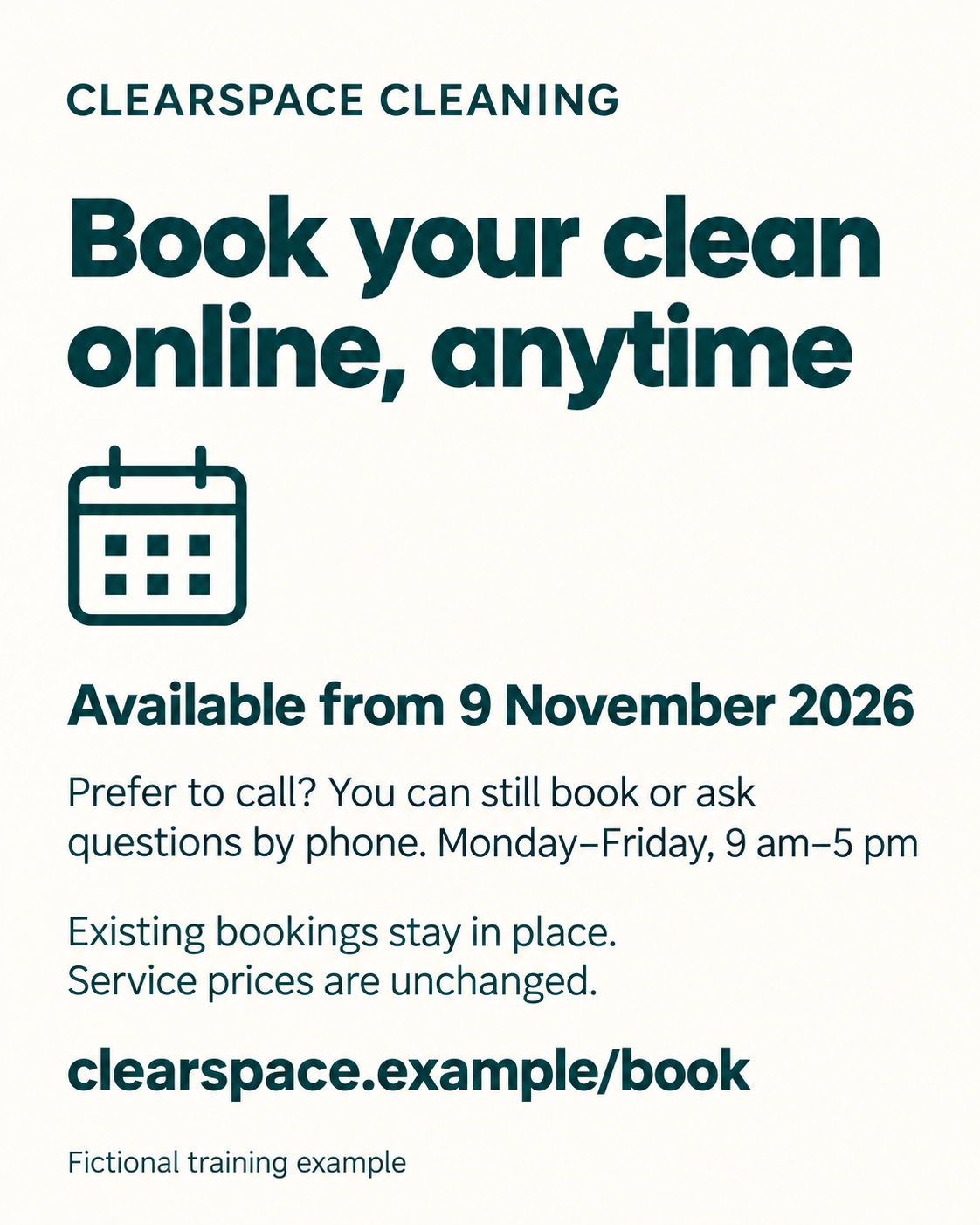
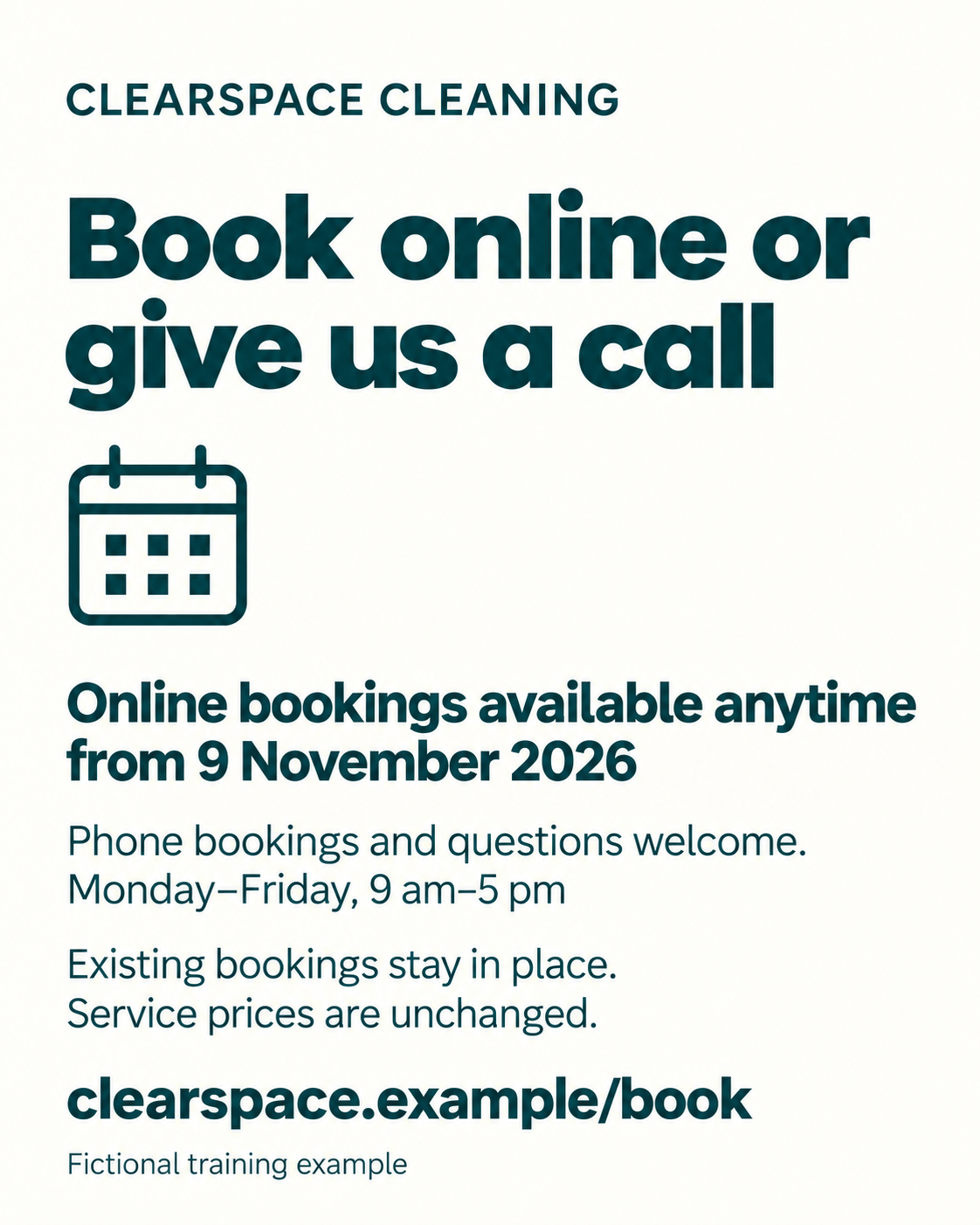
Show two prepared graphics. Both professional, both in the same visual style, differing only in emphasis.
Give AI the audience brief and the communication goal. Scoring with no context tells you nothing useful.
Score both against the same criteria. One rubric, applied evenly.
Inspect the reasons and decide what needs improving. The reasoning is worth more than the score.
Ours carried identical facts with different hierarchies. Graphic A led with "Book your clean online, anytime" and kept the telephone option as clearly readable secondary information. Graphic B led with "Book online or give us a call" and gave the choice of booking channels the strongest emphasis.
 |  |
|---|
The criteria
Message clarity. Is the change easy to understand?
Audience relevance. Does it address needs supported by the feedback?
Tone. Is it welcoming and respectful?
Readability. Is essential information easy to find and read in the image?
Action clarity. Can readers see how to book or ask questions?
Each is scored from 1 to 5. A 1 means substantial problems, a 3 means adequate with some improvements needed, and a 5 means clear and well supported against that criterion.
The prompt
Review two Instagram announcement graphics for the fictional business in the brief. The first image is A and the second is B. Check that you can read both. If any essential text is unreadable, identify it and do not guess what it says.
Assess each option separately before comparing. Use the same brief and five equally weighted criteria: message clarity, audience relevance, tone, readability and action clarity.
Score each criterion from 1 to 5. Return a compact table with the criterion, A's score and visible reason, and B's score and visible reason. Use N/A if you cannot assess a criterion. Report totals out of 25 only if all criteria are assessable. Check the sums.
Separately flag any factual error, invented promise or missing critical instruction, regardless of total score. A high score cannot cancel those.
Do not predict clicks, bookings or audience percentages. These are your rubric-based review scores, not measured audience responses. Keep the output under 350 words.
What came back
B scored 5 out of 5 for message clarity against A's 4. Both scored 4 for audience relevance, 5 for tone, 4 for readability and 5 for action clarity. Neither contained a factual error or an invented promise, and no critical instruction was missing. B came out slightly ahead because it foregrounds the point that customers have two booking options. Both could do more to reassure people that nobody needs to rebook.
Making the decision
Based on your reasons, recommend A, B, neither, or no clear preference. Explain the main trade-off in two sentences. Do not force a winner or treat a small score difference as conclusive.
Suggest one specific improvement to the recommended option, or the most important shared improvement if you cannot recommend one. Finish with one neutral question to ask actual customers before release.
One check worth building into your process, run the comparison again in a fresh chat with the upload order reversed and the labels swapped. If the preference changes, the result is unstable and the reasons matter far more than the scores. Reversing the order does not validate the scores, and it does tell you whether to trust them.
Agreement between you and the AI is useful. Disagreement is worth investigating.
Making the Audience More Realistic
The demos moved quickly, and the real value comes from the quality of the audience you build. The more information you have about your target audience, the better. With solid personas you can test accurately without going out and doing it for real every time.
Good sources to draw on:
Testimonials and recommendations
Interviews with your target audience or existing customers
Interview transcriptions, which give you the actual language and tone customers use when they talk about your product or service
Industry research reports
Deep research in AI, used to build the persona out further
Dr Karen uses interview transcriptions a great deal for exactly this, to get a real sense of how customers speak about a product or service, and then generates content and messaging from it.
Use permissioned, de-identified feedback, keep the unknowns visible, and avoid adding demographic assumptions that your evidence does not support.
Once you have that material, you do not need to start from scratch each time. Set up a project in Claude, a custom GPT, a gem in Gemini or an agent in Microsoft Copilot, and keep adding relevant information about that audience. Then use it to evaluate your messages and go back and forth. The same tests work in Gemini, Meta AI, Grok and Copilot, so use whatever you already have access to.
What Still Needs You
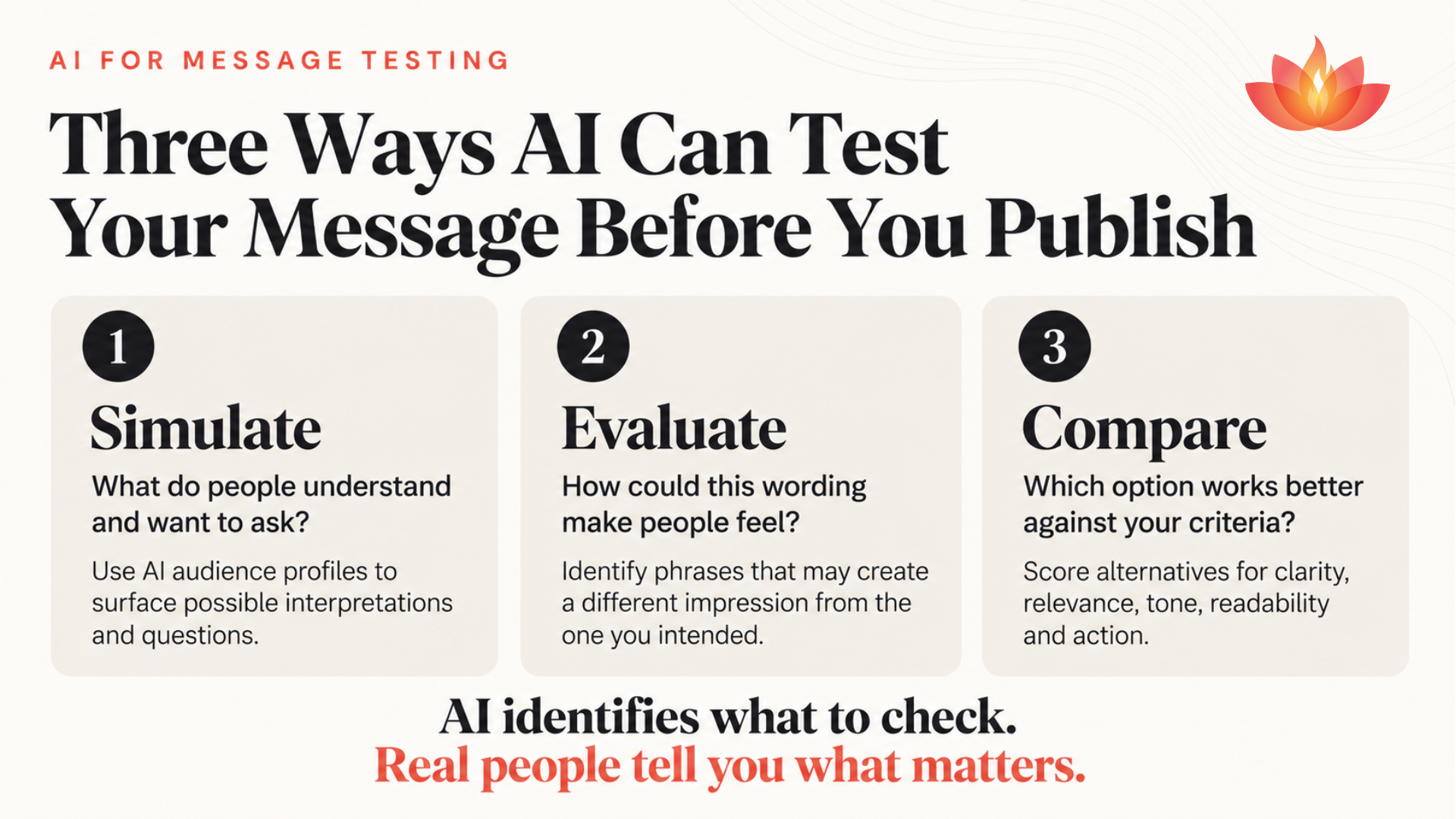
Asking real people is always better, and a mix of both is better again. Market research can be very difficult and expensive, which is the whole reason this approach has taken hold in agencies. What AI does is tell you what to check. Real people tell you which of those things actually matter.
Put these questions to actual audience members:
What do you understand is changing?
What would you do next?
What questions remain?
How does the message come across to you?
Then compare their feedback with the issues the AI raised. Where the two agree, you can act. Where they differ, there is something worth understanding.
Which message are you preparing to send next?
Start with one step. Bring the confirmed facts, a clear communication goal, relevant audience feedback and your draft message. Run one test, review the result and make one useful improvement.
If you want support integrating AI strategically into your business, here are some ways we can help:
Join Dr Karen's AI Integration Sprint - helping senior leaders do the strategy work to integrate AI into their teams, certified by the AI Centre of Excellence.
Come along to our next free webinar, where we work through another practical use of AI live. Details and registration are on the website.
Join our free Facebook community - where we share different AI tools and articles, and go live every Friday afternoon talking about what has happened in AI this week.
Book a chat with Dr Karen - let's talk about how AI can work for your specific situation.
Because AI adoption without strategy creates noise. AI adoption with structure creates advantage.
Key Takeaways
Test messages with a synthetic audience before they go out, rather than learning from the response what went wrong
Build profiles from real audience comments, and make the AI show which comments support each one
Tell the AI not to invent names, ages or segment sizes, and to mark every inference as an inference
Make the simulated readers see only the message, not the background brief
Interrogate tone phrase by phrase, because single words like "should" and "unnecessary" do the damage
Revise with a word limit and a stated tone, and check the confirmed facts survived the rewrite
Score creative options against criteria you set in advance, with the brief attached
Reverse the upload order and run it again, to see whether the preference holds up
Treat the scores as a rubric-based review, never as predicted performance
Feed in testimonials, interview transcripts and research reports to make the persona genuinely useful
Check the AI's concerns against real audience members before you act on them